
Introduction to the Bible / Fellowship : Welcome
You are here because you have received an invite, or expressed an interest in exploring the Bible, Christian Faith and/or enjoy fellowship with us.
We are a friendly group of Christians in Lowestoft, and across the UK. Many in recovery. All have accepted Jesus Christ as our Lord and Savior. We love sharing our faith and understanding while journeying together through regular meet-ups, fellowship, worship, workshops, and Bible study.
During the COVID-19 Crisis we have taken to using ZOOM to hold video meetings and studies. They are fun and easy. You can read more about that further down.
How to Join Us
Join our Private Facebook Group at https://www.facebook.com/groups/biblestudyfellowshipuk/
Join our WhatsApp Group at https://chat.whatsapp.com/CzXzz0Lc5dV6KGAqilQphU
We have found the Facebook Group and WhatsApp Groups the easiest way to send links to the various virtual online meetings.
INTRODUCTION TO BIBLE : JOIN #1
A Private Facebook Group for Introduction to the BIBLE & Fellowship updates, discussion, and messages of encouragement.
INTRODUCTION TO BIBLE : JOIN #2
A WhatsApp Group used to send out Introduction to the Bible & Fellowship ZOOM Meeting Invites.
Max 2 Messages Per day, sent by Admins Only 🙂
Introduction to the Bible / Fellowship
Wednesday 7pm – 9pm
online using ZOOM.
How To Read The Bible
This may be useful for the Bible Study:
- Bookmark the index of your Bible so you can flick to it quickly, to then find what page the scripture is found on.
A note about Scripture References. They are often shown like this (2 Cor. 5:17-18).
Let’s break this down a little. Remembering that the Bible consists of 66 Books.
2 Cor. (Means the ‘book’ called 2 Corinthians – The #2 means there is more than 1 Corinthians book. Some have 3 books ie 1 John, 2 John and 3 John. This is in addition to a book named ‘John’ – Phew!)
5 (the first number after the name of the book is the Chapter number. Each Chapter contains a number of number verses start).
17-18 (these are the verses that we want you to read. Each verse is usually a single line of text.
So that’s how we find 2 Cor. 5:17-18. It’s worth taking 5 minutes to read through the index of your Bible to familiarise yourself with the names of the ‘books’.
Joining us is simple. All you need is WhatsApp and/or Facebook, and ZOOM.
WHATSAPP
We have created a WhatsApp group HERE – please join it now. We use this WhatsApp group to send out the ZOOM Meeting invites for the Wednesday Evening Bible Study and the Spirit, Soul & Body Lessons. Only admins can post to the group so you’ll not recieve hundreds of messages.
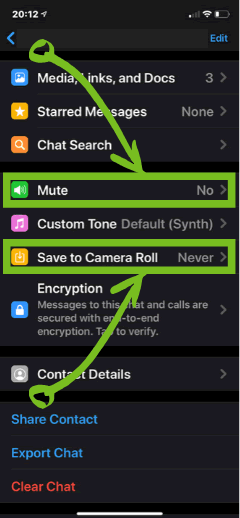
Useful WhatsApp Settings:
The image below shows 2 settings you can change for the WhatsApp Group. The first is ‘Mute’ – This stops your phone pining everytime you receive a message. The second is ‘Save To Camera Roll’ – Turning this to ‘never’ means your phone memory won’t be filled up with the images/photos that we share with you:
FACEBOOK GROUP
We use the Facebook Group to schedule the events. This is useful because it will remind you when you have an event coming up. Join the group here.
INSTALL ZOOM
ZOOM is available for smartphones, tablets, laptops and desktop PC/MAC. it’s easy to use, and we will show you how to get the most out of it. ZOOM is FREE and you do not have to create an account if you don’t want to.
The best ZOOM experience is on a Laptop or Desktop PC/MAC that has a Camera & Microphone, but works perfectly well on Smartphones and Tablets by installing the Mobile App. You can Download/Install ZOOM here. When you start using it, we’ll be able to show you how to get the most out of it.